11:
have more adventures (be more adventurous)
learn to grill
be frugal & get financially in shape (organized, with a plan)
curse less
get back to writing thank you notes and real letters
say “no” sometimes
purge often
build better friendships
host dinner parties
travel
Tuesday, January 04, 2011


Monday, June 21, 2010
last project: exhibition design (part 1: overview)
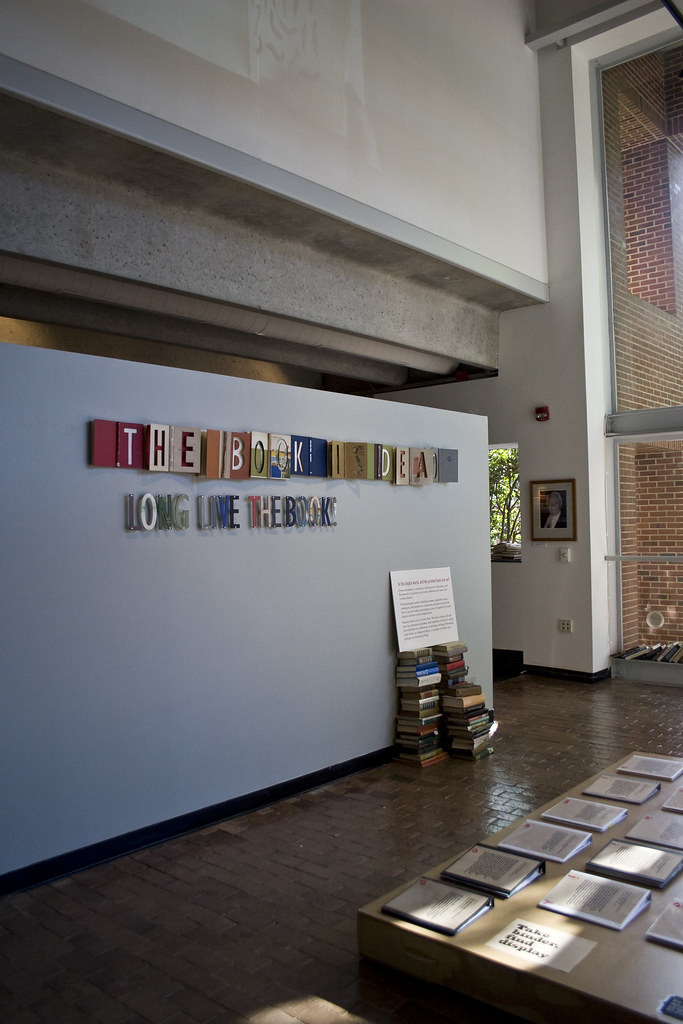
I had the pleasure of taking Katie Meaney's excellent exhibition design studio as my last. I learned so much, and made so much. We chose books from D.H. Hill library (the main collection on campus) that piqued our interest. Some we thought should be treated as rare (many were quite old) and entered into "Special Collections", others were quirky, and some just beautiful.
From these books we created a kit of parts, collecting images of the books (glamour shots) and mutated images from which to design. We designed giant banners, posters, labeling systems, display cases and supplementary materials (many books, a blog, case explorations, invitations, posters, comprehensive exhibition-wide labeling, and more). The semester concluded with an exhibition (The Book is Dead! Long Live the Book in the Allred Gallery in Kamphoefner) that really was quite stunning. It was a great mix of individual and team work, with truly fantastic results. My classmates were amazing!
I really hope to continue in exhibition design. My post at the NCMOH is very much just graphic design, but I hope, as time goes on, to be able to integrate these interests and departments. I loved mixing shop work (ooh, power tools, oh, laser cutter!) with laptop time, thinking about the intimate (a handheld book) as well as the 3d and spatial needs.
Image above stolen from Meg O'Brien. I don't think she'll mind =)
new ventures
I'll skip the excuses and apologies for no posts in months.
It's been an amazing and busy 2010 so far. I graduated in graphic design just over a month ago, scooped up a job at the Museum of History as (get this) a graphic designer, and have been joyfully busy with family and friends (weddings and reunions and cookouts. This life (THIS ONE!) is a good one.
I'm quite thrilled to have found something in my field, in a museum no less. I'm anxious to start some real design projects (and to graduate from resizing, mock-ups, and template filling sort of work I've been assigned so far), but imagine this is all part of the dues-paying phase of my career. Ever the impatient lady, I'm chomping at the bit, ready to get started! I want to use by brain! Practice my skills!
Friday, March 05, 2010


Wednesday, February 17, 2010
That project I was working on...

Here it is! I was lucky enough to design the commencement program for the College of Design's December graduation ceremony. It was such a fun project. The pattern is based on a window that is in both Leazar and Brooks (two of the College of Design's buildings). It was printed on Mohawk Linen paper and folds in thirds, and then opens to reveal a poster-of-sorts with the roofline of Brooks Hall and the graduation date (seen below). I even got to include a gradient, something I've never used in earnest before (as opposed to capitalizing on the tacky possibilities of gradients). Win!

Wednesday, December 09, 2009
another sneak peek, plan-making and procrastination

Counting down until my school obligations are complete! Just an exam (for which I am woefully unprepared), my "mid-residency review," and a paper to go! Looking forward to Friday evening, and then a winter break complete with holiday-gift-gathering, holiday-card-making, some decorating, hopefully a mini-road trip or three, studio-time and REST.
*Sneak peek of a project I'm working on, set to go to print on Friday!
Monday, December 07, 2009

Monday, November 16, 2009

Thursday, November 12, 2009
Thursday, October 29, 2009
some kind words

Some kind words on the current exhibition at the Block Gallery, Retrospective25. This was definitely the biggest (in scale and in importance) exhibition I've curated, so its positive review is especially appreciated. Coincidentally, this is the last exhibition of my Block Gallery career, as tomorrow is my last day. I couldn't be more grateful for the experience I've gained working with the Arts Commission, and for the opportunity to work with the fabulous, accomplished and amazingly talented artists (especially in the Retrospective).
Check out the whole review here. Thanks to Dave Delcambre and the Independent Weekly for covering art!
Subscribe to:
Posts (Atom)